Mirko Bassani: DotDot

Mirko Bassani

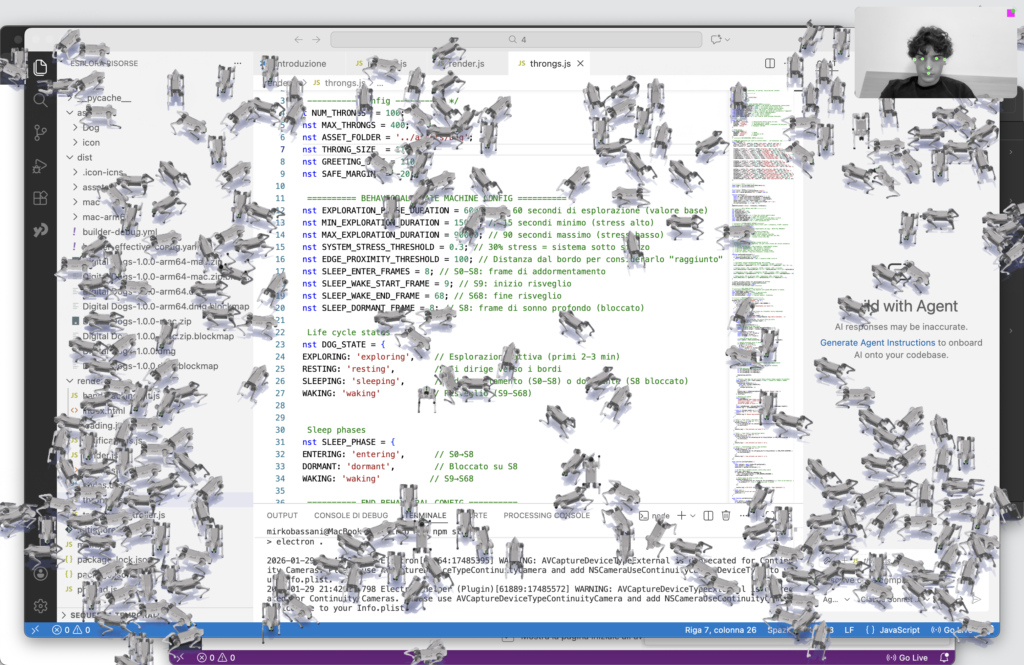
DotDot is a desktop application designed as a small autonomous companion.
It is not a productivity tool or an assistant, but a living presence that quietly inhabits the screen during everyday work.

The creature operates independently, following its own life cycle: moving, exploring, resting, sleeping, and waking without direct commands. Its purpose is not efficiency, but avoiding solitude. Over time, and often without the user noticing, it replicates itself, gradually populating the desktop like a natural process unfolding in the background.

Its behavior is shaped by the conditions of the system it inhabits.
CPU load, battery drain, and overall system pressure are perceived as stress, altering how it moves, rests, and reacts. As stress increases, the creature becomes more restless and alert, as if its environment were turning hostile.

The project exists to make invisible machine states perceptible.
Instead of showing technical data through charts or metrics, system activity is translated into expressive behavior, transforming the desktop from a neutral interface into a shared environment between user, machine, and digital life.
GitHub repository

Composizione 2_1

icona

The application continuously reads and interprets the computer’s hardware parameters, transforming them into environmental conditions that influence the behavior of the dogs. Data such as CPU load, battery consumption, and overall system pressure are processed as signals of stress: when the system is under strain, the dogs become more restless, alert, or unstable; when conditions are stable, their behavior appears calmer and more regular.

Beyond the internal states of the machine, the application also reacts to external stimuli generated by the user. Through face tracking via the webcam, the dogs perceive the orientation of the user’s head and understand whether the user is actually looking at the screen or if their attention is elsewhere. Mouse movements are interpreted as presences in space, influencing direction, curiosity, and distance.

The system is also sensitive to hand movements: simple gestures become forms of direct communication, allowing the user to interact in a spontaneous way—for example, by waving at the dogs. In this way, interaction does not occur through buttons or explicit commands, but emerges from a combination of bodily, behavioral, and environmental signals.

Registrazione schermo 2026-01-29 alle 11.26.16

Intelligent click-through overlay

One of the most interesting components of DotDot is its intelligent click-through system, which allows the application to live above the desktop without becoming intrusive.

DotDot runs as an always-on-top layer, but it selectively captures mouse input only when the user is actually interacting with a creature. When the cursor is not hovering a DotDot entity, the window becomes transparent to mouse events, allowing the user to keep working normally on the underlying system.

Technically, the app continuously reads the global mouse position, converts it into window-relative coordinates, and checks whether the pointer overlaps an interactive entity (a DotDot instance). If interaction is possible, mouse events are enabled; otherwise, the window switches back to click-through mode.

This creates a frictionless experience:

  • the desktop remains usable at all times

  • DotDot feels present but never blocks the workflow

  • interaction appears only when the user intentionally engages

click-through logic

// throngs.js — click-through overlay based on hover + drag state

async function updateMousePosition() {
  const globalPos = await window.API.getMousePosition();

  // Convert global coordinates into window-relative canvas coordinates
  const relativeX = globalPos.x - windowBounds.x;
  const relativeY = globalPos.y - windowBounds.y;

  mousePos.x = relativeX;
  mousePos.y = relativeY;

  const throng = getThrongAtMousePos(relativeX, relativeY);

  if (throng && !isDragging) {
    // Cursor is over a DotDot → enable interaction (capture mouse events)
    await window.API.setIgnoreMouseEvents(false);
    canvas.style.cursor = 'grab';
  } else if (!isDragging) {
    // Cursor is NOT over a DotDot → enable click-through (ignore mouse events)
    await window.API.setIgnoreMouseEvents(true);
    canvas.style.cursor = 'default';
  }

  // If dragging, keep updating the DotDot position smoothly
  if (isDragging && selectedThrong) {
    // ... clamp to bounds + update position
  }
}

// Mouse polling ~60fps for immediate responsiveness
mouseUpdateInterval = setInterval(updateMousePosition, 16);

The project uses two webcam-based tracking systems to enable interaction without traditional UI controls.

Face tracking is used to detect presence and attention. The system evaluates whether a face is visible, oriented toward the camera, and actively looking at the screen. Attention is calculated as a continuous value and decays over time when the user looks away or leaves the frame, ensuring stable and natural behavior.

Hand tracking is used for intentional gestures. Specific gestures such as waving, snapping, or forming a heart are recognized only when held deliberately and are regulated by cooldowns to prevent accidental triggers. Once detected, gestures are translated into semantic events that influence the creatures’ behavior.

Together, these systems combine passive presence with active interaction, allowing the application to respond to attention and gestures without buttons, menus, or explicit commands.

System stress calculation (behavioral driver)

In DotDot, stress is not a visual effect but a core behavioral variable.
It represents the perceived hostility of the environment in which the creatures live — the operating system itself.

Instead of relying on a single metric, stress is treated as a normalized, continuous value derived from multiple system signals, primarily:

CPU load (system pressure)

Battery variation (energy instability)

These values are combined into a single stress level in the range 0 → 1, allowing the system to react gradually rather than through binary states.

Core logic

function getSystemStressLevel() {
  const cpuStress = cpuUsage / 100;          // normalize CPU load
  const batteryStress = batteryDrainRate;    // normalized energy drop

  // Combine multiple signals into one continuous value
  const stress = clamp(
    cpuStress * CPU_WEIGHT +
    batteryStress * BATTERY_WEIGHT,
    0,
    1
  );

  return stress;
}

The project begins with the recreation of Thronglets, used as a conceptual starting point to understand from the inside the logic of a digital companion that lives on the desktop: a system made of micro-behaviors, idle time, reactions, and internal states. Rebuilding this experience was not a purely technical exercise, but a fundamental step in transforming an external reference into a design language. It allowed me to identify the mechanisms that make a digital presence believable, such as rhythm, autonomy, repetition, and unpredictability and to define the conceptual direction of the project.

From this foundation, the development of the subject began. The dog was designed not as a simple mascot, but as an entity with a behavioral identity. Its proportions, silhouette, posture, and attitude were carefully defined to communicate character even before animation was introduced. This phase was essential because it established coherence across the entire project: without a clear subject, movement risks becoming purely decorative.

Movement was then treated as a structural component rather than an aesthetic addition. To achieve a credible and repeatable walking cycle, I worked in 3D, creating renders and motion sequences in Blender using the open-source 3D model of the GO2 robot by Unitree Robotics. This step was crucial, as it allowed precise control over poses, timing, direction, and gait cycles, forming a solid foundation for both 2D animation and the final implementation.

Finally, the construction of the system transformed assets and animations into a living behavior. States, transitions, variations, and rules determine when the dog walks, stops, reacts, or changes rhythm. At this stage, all previous phases converge: the conceptual inspiration (Thronglets) becomes structure, the subject becomes recognizable, movement becomes believable, and the system as a whole produces the final outcome—not a simple animation, but an autonomous presence governed by its own internal logic.

Thronglets first prototipe

Thronglets walk on Figma : O

Registrazione schermo 2025-11-05 alle 13.42.37_3

Registrazione schermo 2025-11-05 alle 13.42.37_4

Registrazione schermo 2025-11-05 alle 13.42.37_6

Registrazione schermo 2025-11-05 alle 13.42.37_5

Registrazione schermo 2025-11-05 alle 13.42.37_7

WalK

Flip

Idle

DotDot

TRUST THE PROCESS