Cristian Sommaiuolo: AOKI Soundwidget
Aoki is a widget that sonifies your computer’s activity. It monitors the CPU and RAM usage percentages for a ten-minute period, and based on the average values of these two parameters, it can provide a sonified version of your computer’s performance. Specifically, the total percentage, for both CPU and RAM, has been divided into ten intervals of ten units each (1-10%, 11-20%,…91-100%). At the end of the monitoring phase, the widget calculates and evaluates the two average values, and based on these, it chooses two from a library of 20 audio tracks, one for each parameter but overlapping. The track library consists of two distinct types of tracks, one with only harmonic sounds and the other with only percussive sounds. The former have a harmonic spectrum, whose sound increases in frequency as it moves from lower to higher pitched sounds with increasing percentage. Percussive sounds, on the other hand, are organized to create a percussive line that starts with very few elements and then expands to include more sounds, reaching maximum density in the last track, corresponding to 100% RAM usage. The CPU value determines the harmonic track, while the RAM value determines the percussive track. In this way, based on the average values, one hundred different combinations can be obtained.
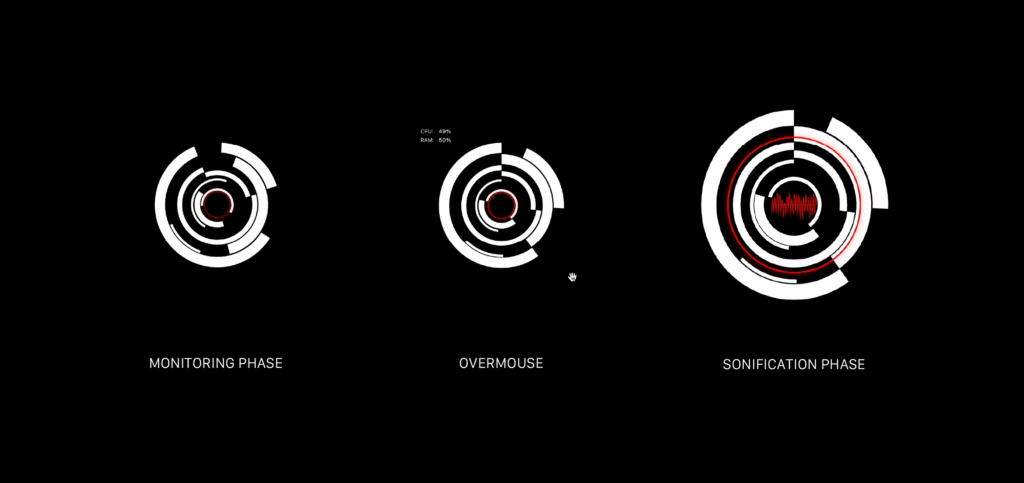
Phases: Monitoring, Overmouse, Sonification.
Graphically, the widget consists of a series of concentric white circles of varying thicknesses that rotate around the center, their rotation speed proportional to the CPU usage percentage.consists of a series of concentric white circles of varying thicknesses that rotate around the center, their rotation speed proportional to the CPU usage percentage. The smaller circle in the center is red, and its opacity is proportional to the RAM usage percentage, allowing you to monitor these two values even during the monitoring phase. Once this phase is complete, the widget opens, the concentric circles expand, and the two overlapping audio tracks begin playing. The innermost red circle now responds to the intensity of the music by varying its radius in real time, and an empty space is created in the center of the widget in which you can see the waveform resulting from the sonification.
At the end of this phase, which lasts one minute, the widget turns off the waveform display, closes, and silently resumes the monitoring phase.